
How to Level Up Towers in Aether Tower Defense: In-Match Upgrades and Unit Levels
Press UPGRADE on a placed tower's panel to buy levels from Lv.0 to the Lv.5 MAX LEVEL cap, boosting stats each step — and learn how your towers' persistent unit levels grow from stage-clear EXP.
Quick answer
Select a tower you have placed on the map during a match and press UPGRADE on its panel: each press pays the displayed in-match price, raises the tower one level on the Lv.0 to Lv.5 scale and boosts its stats. At Lv.5 the panel reads MAX LEVEL. Towers also carry a separate, persistent unit level that grows from EXP earned by clearing stages.
- Where: the placed tower's own panel, opened by selecting the tower during an active match.
- Cost: the price shown on the UPGRADE button, paid in the match's in-match currency.
- Effect: the changes listed in the panel's before -> after stat rows, up to the Lv.5 MAX LEVEL cap.
- The other level: your account's unit level for each tower, fed by EXP from stage clears.
A tower's level means two different things in Aether Tower Defense, and knowing which one you are looking at tells you where the number comes from: upgrade levels are bought match by match from the tower's own panel, while unit levels belong to your account and grow from stage rewards.
Raising a tower's level during a match
Leveling a tower inside a match is a purchase made from its own panel:
- Place a tower on the map during an active match.
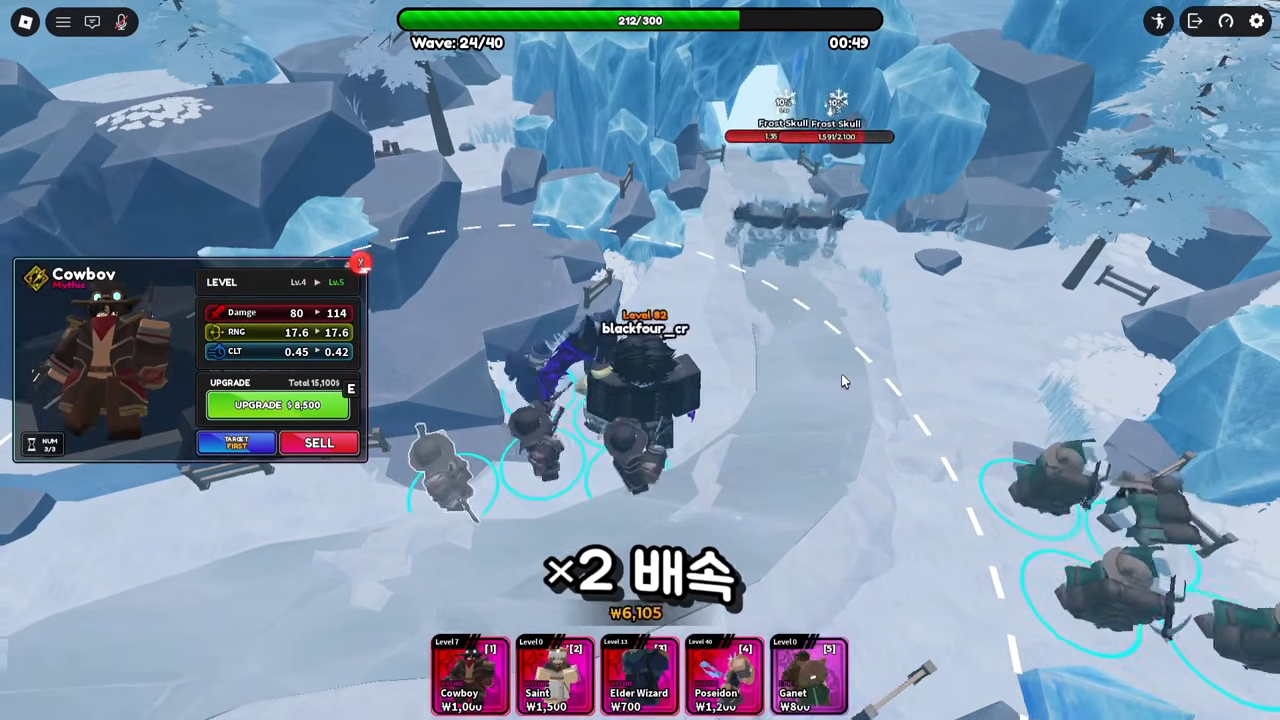
- Select the placed tower. A panel opens headed 'LEVEL Lv.N -> Lv.N+1', listing stat rows with before -> after values, an UPGRADE button carrying the next level's price, a Total percentage, and TARGET FIRST and SELL buttons alongside.
- Press UPGRADE to pay the displayed price. The tower immediately moves up one level and the panel refreshes with the next step's numbers.
Upgrades are paid for with the match's in-match currency. In a Snow Field EXPERT run, those prices read $5,000 for Ganet's Lv.3 -> Lv.4 step, W6,900 for Cowboy's Lv.4 -> Lv.5 step and W4,000 for Saint's Lv.1 -> Lv.2 step.
What each upgrade changes
Every upgrade raises the tower's stats, and the panel previews the exact change through its before -> after rows before you spend anything. Observed steps from a Snow Field EXPERT run:
| Tower | Upgrade step | What the stat rows showed | Price |
|---|---|---|---|
| Ganet | Lv.3 -> Lv.4 | Income 375 -> 550; CLT stayed at 6 | $5,000 |
| Cowboy | Lv.4 -> Lv.5 | Damage 80 -> 114; CLT 0.45 -> 0.42; RNG stayed at 17.6 | W6,900 |
| Saint | Lv.1 -> Lv.2 | RNG stayed at 16 | W4,000 |
Two things in those numbers matter for how you buy upgrades. First, a step does not necessarily touch every stat — Saint's Lv.1 -> Lv.2 purchase left RNG unchanged at 16 — so the before -> after rows, not an assumed all-around boost, are what tell you what the next level actually buys. Second, towers grow along different axes: Cowboy's last step added damage and shaved its CLT from 0.45 to 0.42, while Ganet's step lifted Income from 375 to 550.
The panel's Total percentage sits alongside these rows: 6,100% showed on Ganet's Lv.3 -> Lv.4 step, 15,100% on Cowboy's Lv.4 -> Lv.5 step, and 35,000% once Saint had reached Lv.5.
The Lv.5 cap
The in-match upgrade scale spans five upgrade steps, from Lv.0 up to Lv.5. At Lv.5 the price is gone and the panel reads MAX LEVEL instead. In the same Snow Field EXPERT run, Saint finished at Lv.5 with RNG 23 and a Total of 35,000%, while Poseidon's Lv.5 panel showed Splash 8, Damage 468, RNG 22 and a Total of 39,300%.

Unit levels: the persistent number on each tower
The other level in Aether Tower Defense belongs to your account, not to a single match. Each slot in your loadout hotbar displays your unit level for that tower — one Snow Field EXPERT solo loadout showed Level 7 Cowboy, Level 0 Saint, Level 13 Elder Wizard, Level 40 Poseidon and Level 0 Ganet. A number like Level 40 sits far outside the Lv.0–5 in-match scale, because the two labels measure different things: the panel's Lv.0–5 is the upgrade ladder you buy through during a run, while the hotbar and results list track your account's unit level for the tower.
Unit levels grow from EXP earned by clearing stages. Clearing a stage opens a results window listing the run's rewards alongside per-unit EXP. That Snow Field EXPERT clear paid Coins 8000x, Aether 5x and Exp 300x, and the unit list showed Cowboy moving 'Lv. 7 -> 8' on +1360 EXP (90%) and Elder Wizard moving 'Lv. 13 -> 14' on +650 EXP (14%), while Saint, Poseidon and Ganet each listed +0 EXP (0%).
One caveat worth knowing before you grind: the results window does not explain how EXP is divided among the towers you brought, or how much EXP a unit level requires — so some towers can leave a clear with nothing while others level up. What the screens do show plainly is that clearing a stage pays unit EXP through the results window, and that 'Lv. 7 -> 8' there is a different number from the Lv.0–5 ladder inside a match.
Where leveling fits in tower growth
Leveling is one of two growth layers on a tower. It raises a tower's basic strength; traits form the second layer, a customization system added on top that can steer the same tower into a different role. The game's own guidance ties them together: use the summoning system to collect a variety of towers, then 'Level them up and grant them traits to make them even stronger.' New summons widen your options, and levels and traits decide whether those options hold up in later defense.
For the surrounding systems, see the Aether Tower Defense towers overview, the summoning guide for collecting towers, the traits guide for the second growth layer, the Snow Field solo guide for the run used as an example above, and the beginner guide for first steps.